Existing store and product reporting. Dedicated Brand Analytics reports are a separate planned integration.
THE WORK BEHIND EVERY STORE
From “what changed?”
to “what should we do?”
Explore how Large Launcher supports daily store reviews, product decisions, replenishment and financial reconciliation, with a clear roadmap for after-order and brand workflows.
Explore the existing product in a demo. Public Amazon onboarding is pending. Planned extensions are marked within each workflow so you can distinguish today’s scope from the roadmap.
01 / Daily priorities
What needs attention before you start the day?
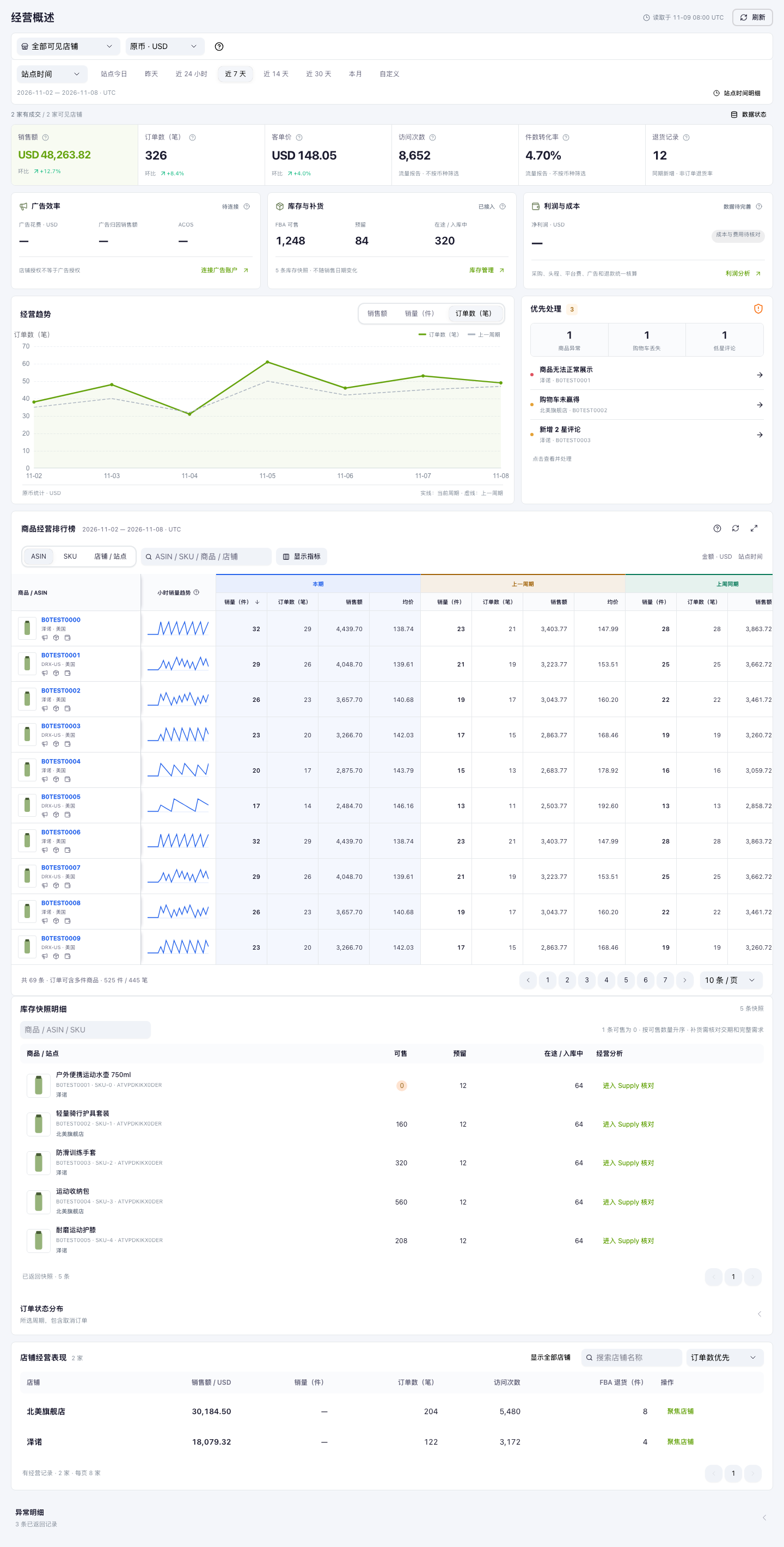
Opening each store tells you what happened in that store. It is harder to see which change deserves your attention first. Start with the same reporting period across stores, then move from the overview to the affected products.
- Compare sales, orders and conversion in the store overview.
- Inspect product trends and period comparisons without losing store context.
- Use inventory and issue summaries to decide what needs a closer look.
What this helps you decide
A focused daily review: which store to investigate, which product to check, and which question to take to the team.
 Look inside ↗
Scope and connected data
02 / Products & pricing
Which products deserve your next decision?
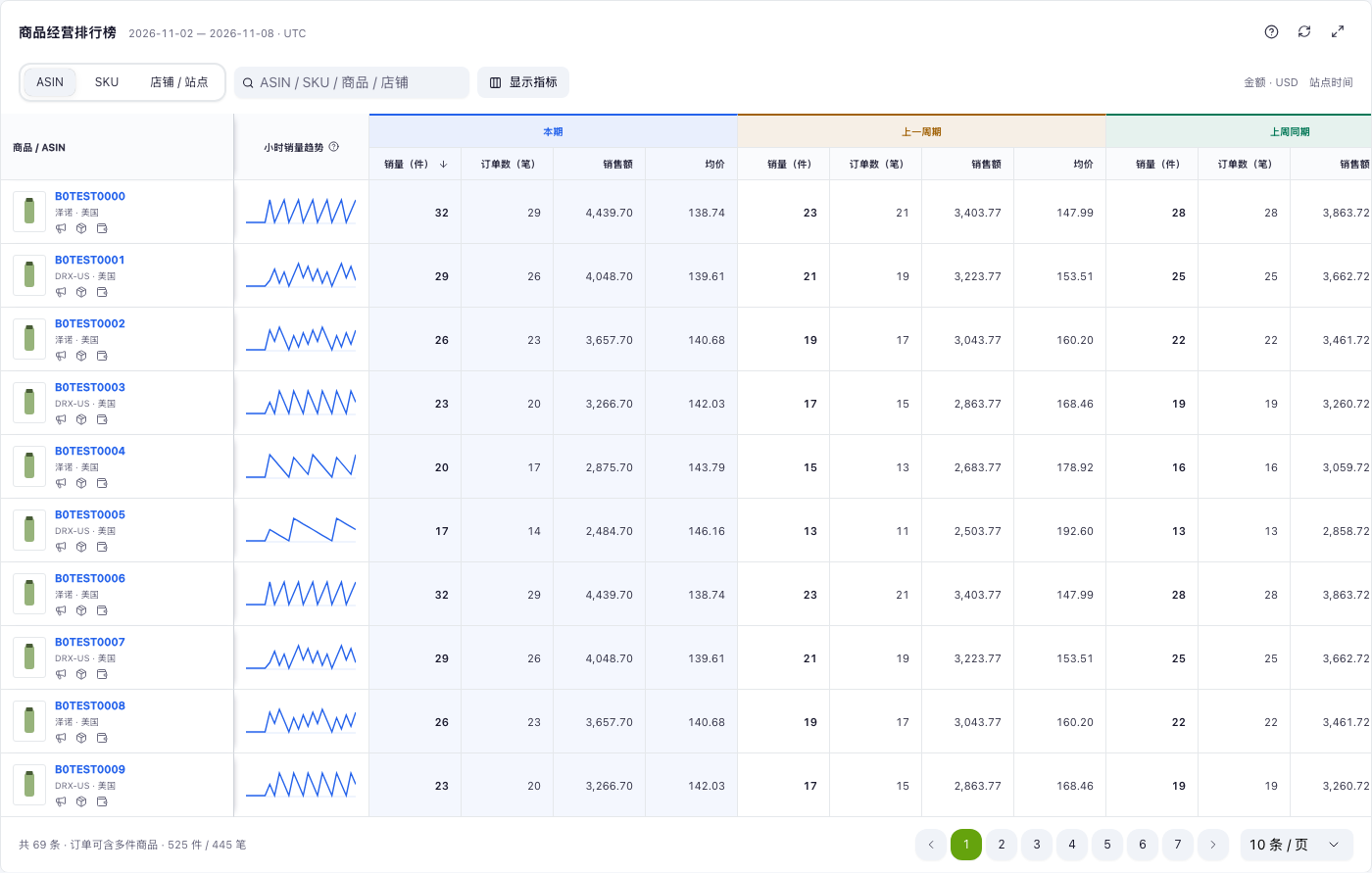
A sales ranking is a starting point, not a pricing decision. Check the listing, SKU and offer context behind a product before changing your plan. Use performance comparisons to choose where to investigate.
- Find the product and its listing records in the right marketplace.
- Review SKU details and marketplace offer prices alongside the product’s sales context.
- Use cost and settlement review to inform the next pricing discussion.
What this helps you decide
An informed product review, with the evidence for a listing or pricing decision in reach. Seller-configured price updates are planned; current scope includes offer visibility.
 Look inside ↗
Scope and connected data
Product Listing
Implemented modulesManage seller-authorized catalog, listing and SKU records; extend supported listing operations as permissions are approved.
Data purpose and access conditions ↗Pricing
Partially implementedReview offer prices; plan seller-configured price updates with validation and an audit trail.
Data purpose and access conditions ↗03 / Stock & fulfillment
Can your stock support the next sales cycle?
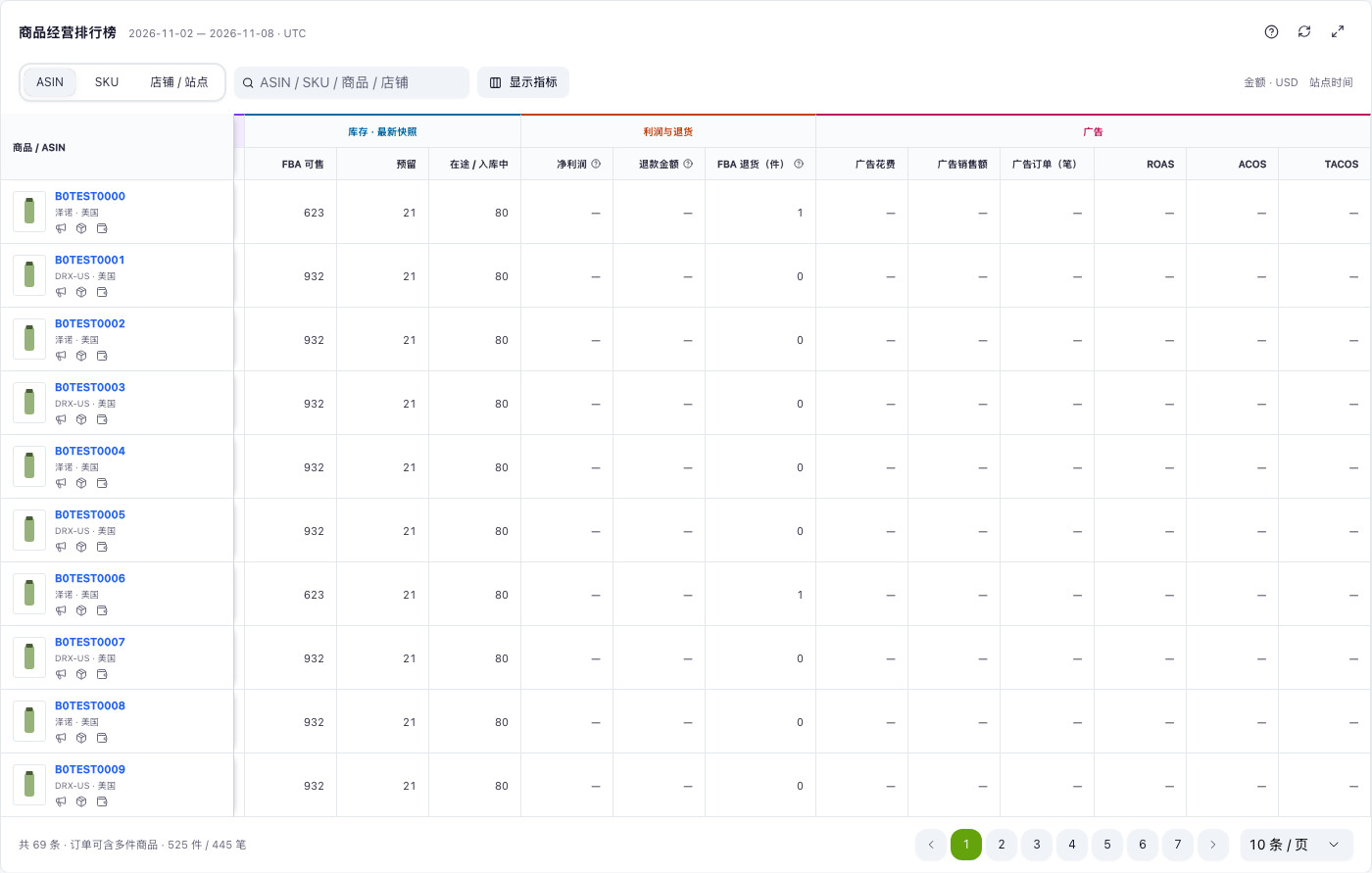
Available stock, reserved units and inbound shipments answer different questions. Review them together with orders before committing more cash to replenishment. A low available balance is a reason to investigate, not an automatic purchase instruction.
- Check available, reserved and inbound quantities by product and store.
- Follow order status and FBA inbound shipment information.
- Discuss replenishment using current stock and sales activity; verify your supplier lead times separately.
What this helps you decide
A clearer replenishment conversation between operations and purchasing. AWD visibility and Amazon Shipping workflows are planned extensions, not current shipping services.
 Look inside ↗
Scope and connected data
Inventory and Order Tracking
Implemented modulesSynchronize authorized inventory and order status to support store-level operational decisions.
Data purpose and access conditions ↗Amazon Fulfillment
Partially implementedTrack FBA inventory and inbound shipments for authorized seller replenishment and fulfillment operations.
Data purpose and access conditions ↗Amazon Warehousing and Distribution
PlannedReview AWD inventory and inbound shipment details to support seller warehouse replenishment planning.
Data purpose and access conditions ↗Amazon Logistics
PlannedSupport eligible Amazon Shipping rate selection, shipment purchase and tracking, subject to approved operations and data access.
Data purpose and access conditions ↗04 / Costs & reconciliation
Sales are up. What actually reached the business?
Sales, settlement proceeds and profit are different views of the business. Fees, timing and your own costs can explain the gap. Review them with their source records before treating a sales increase as a margin improvement.
- Review settlement transactions and platform fees.
- Bring in operating costs and review financial reports with their available inputs.
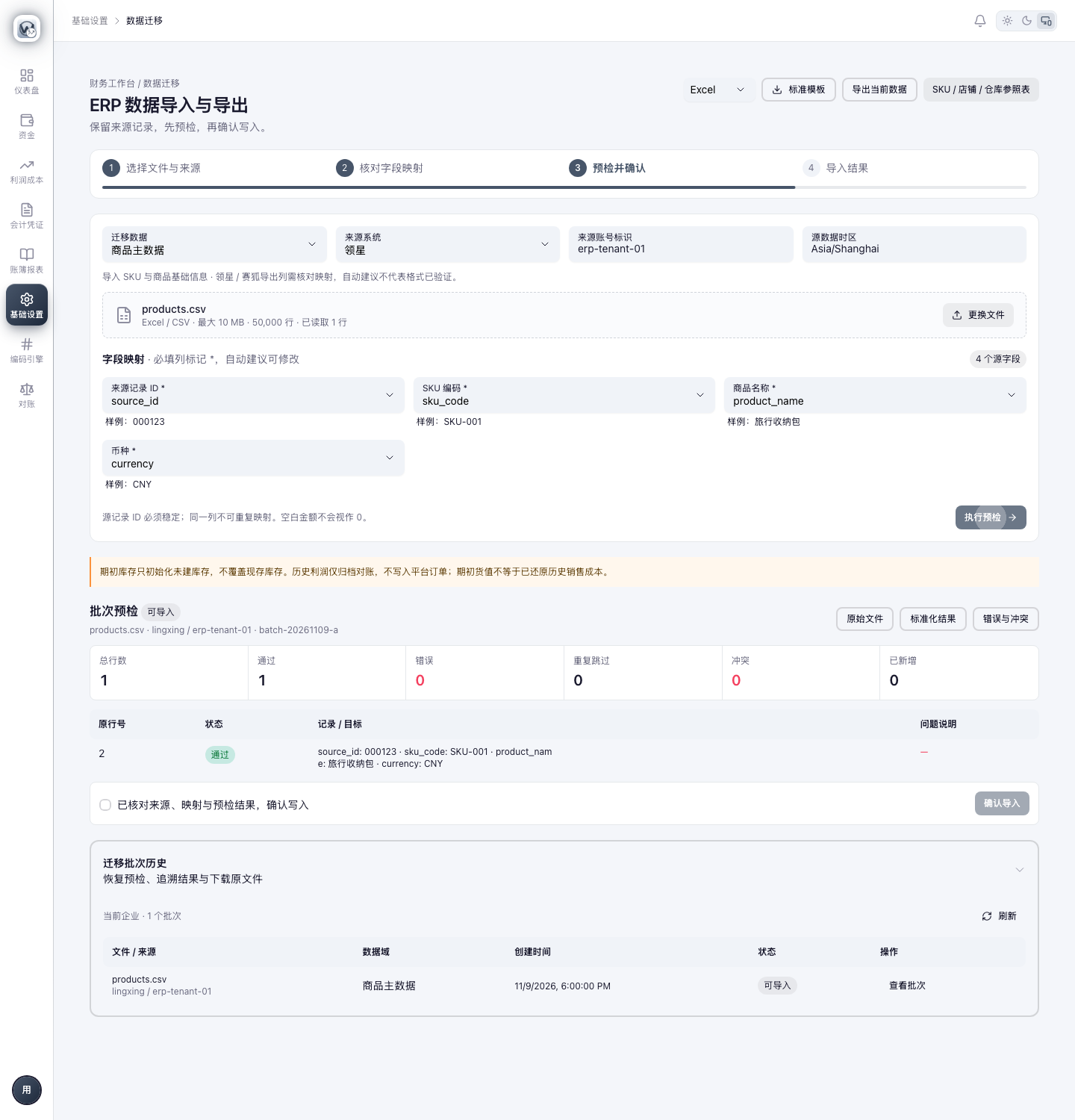
- Map ERP import fields and check batch validation before confirming a data import.
What this helps you decide
A traceable financial review for your team. Report completeness depends on the source data and costs you provide; missing costs are not profit.
 Look inside ↗
Scope and connected data
Finance and Accounting
Implemented modulesProcess settlement, transaction and fee records for reconciliation, cost review and financial reporting.
Data purpose and access conditions ↗05 / After the order
What should happen after an order?
Order service and feedback requests are different jobs. The planned after-order workspace separates a necessary order-related message from an invitation to leave an honest review, with the appropriate eligibility check for each.
- Planned: check which service messages are permitted for an order before sending.
- Planned: check review-request eligibility and use the official review and seller-feedback template.
- Planned: prevent duplicate review requests and retain the API outcome for follow-up.
What this helps you decide
The intended result is a consistent follow-up process, not a promise of more positive reviews. These sending workflows are not live.
Planned
Service first. Feedback by invitation.
- Review the order and permitted actions
- Check service-message or review-request eligibility
- Use the supported action and record its outcome
Official review invitations do not select for positive sentiment or offer incentives. Service messages are limited to permitted order-related purposes.
Scope and connected data
Buyer Communication
PlannedCheck available Messaging API actions and send permitted order-related service messages; no unsolicited marketing.
Data purpose and access conditions ↗Buyer Solicitation
PlannedCheck order eligibility and send official review and seller feedback requests through the Solicitations API with duplicate prevention.
Data purpose and access conditions ↗06 / Brand & team
How does the team turn a review into next steps?
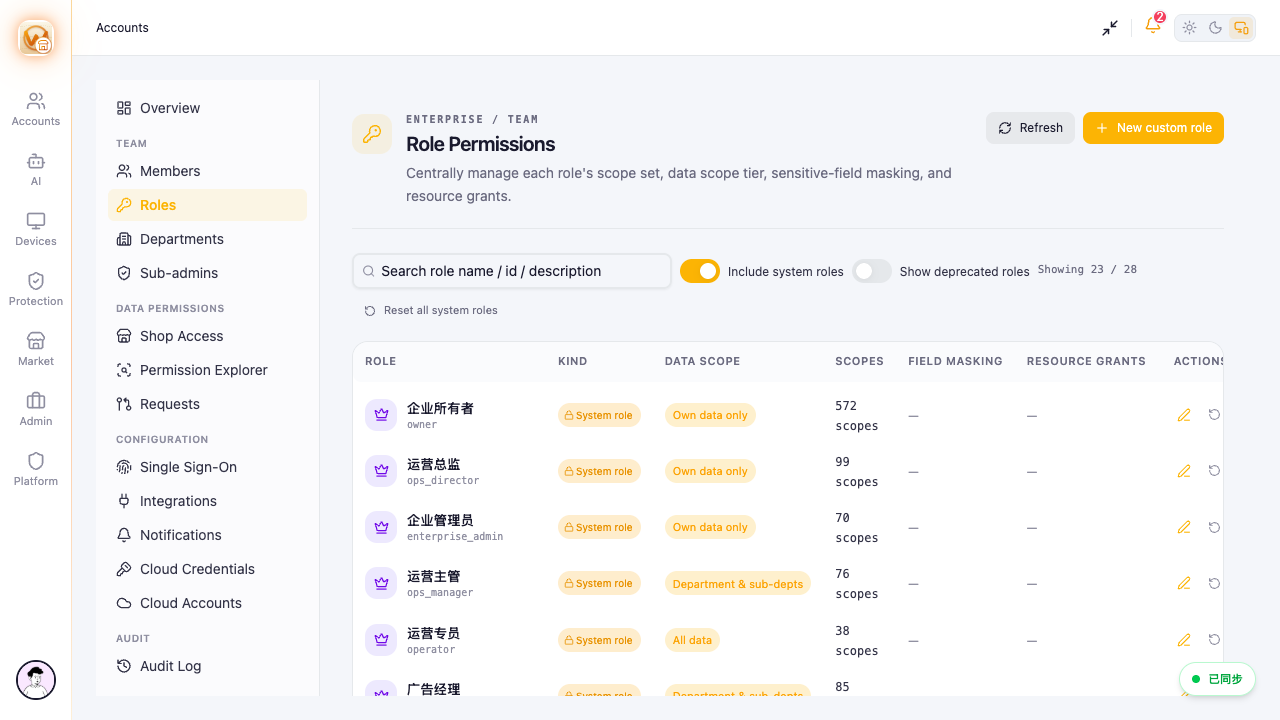
As the business grows, the owner, operators and finance team need different views of the same stores. Existing role settings help organize access. The roadmap adds brand insights and account follow-up so that more decisions can start from shared information.
- Review role scopes and module access in the team workspace.
- Planned: review eligible brand search reports alongside sales and inventory context.
- Planned: track account action items, supported product certifications and relevant app notifications.
What this helps you decide
Give the right people the context for their work. Brand Analytics, seller insights, sustainability certification workflows and Seller Central notifications remain planned.
 Look inside ↗
Scope and connected data
Selling Partner Insights
PlannedSurface authorized account and performance insights and actionable issues for seller follow-up, using approved operations.
Data purpose and access conditions ↗Brand Analytics
PlannedUse authorized brand reports for search, sales and inventory analysis where the seller and marketplace are eligible.
Data purpose and access conditions ↗Sustainability
PlannedHelp sellers view and submit supported product sustainability certification information; do not issue or guarantee certifications.
Data purpose and access conditions ↗Notifications in Seller Central
PlannedDeliver relevant application notifications in Seller Central through App Integrations where eligible and approved.
Data purpose and access conditions ↗Bring your stores and questions to the demo.
We’ll confirm the required marketplaces, available data and supported operations with you. Product screenshots use example data; a visible screen is not a claim that every Amazon integration is available.
Browse all 14 product screenshots ↗Bring a business question. We’ll walk through the workflow.
A stock decision, a settlement discrepancy, or a weekly store review: tell us where your team gets stuck. We’ll discuss the relevant screens, data and setup with you.
Book a workflow demo ↗